Wednesday, 26 September 2012

Apps in Class - Pic Collage


After some advice from Antony Evans I was eager to try our the app Pic Collage with my class today.

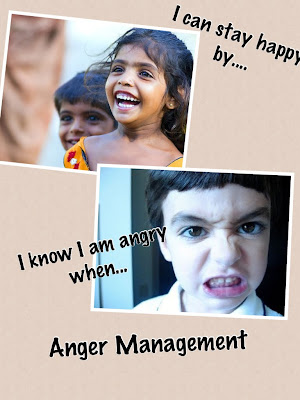
The lesson itself already had the outcome of creating a poster to think about how we handle anger. So after playing with this great app that allows you to place images, text and stickers on a page just like a poster I was hooked.

The children where give the task of taking a photo of themselves angry and happy and explain how we know we are angry and how we can stay happy. The example below shows what I created to show the idea, the images where inserted from inside the app using a Google image search tool.


They had 15 minutes to complete this task in groups of 3. I spent 1 minute explaining the app and then set them to work. A few children asked a few questions about how to add text but the children took to the app quickly and all expect one group produced a poster. Considering this was the first time this class had used the iPads as a whole class is worked extremal well. A simple app with a clear task helped to make this successful. We shared the work by emailing them to a blog where they auto posted - we will come back and review them next week. Here are two examples.


I'd recommend this app as a quick way to create record events using photos in class. Could science experiences be recorded this way?

Check it out...
Link to App store

Thursday, 14 June 2012

Video Conferencing with America


Over the last 2 terms I have been regularly video conferencing with a school called Dover Elementary in Westlake Ohio. 

Now until recently it has focused on each class telling the other about different things such as Thanksgiving, Christmas and Easter. These have been nice sessions but they have been stand alone.
Since Easter we have had a bigger focus. We have been investigating and telling each other about our local area. This has linked to Dover’s topics than ours but I ran with it and adapted my lessons to it. 


For our first session we had the children researching interesting places within a mile of their school. I tried to do this as a field tip but due to weather it was done virtually using ipads and Google street view - more on this in another post. The children produced short PowerPoint’s of the interesting areas which we could show. The classes then met and presented what they had found. We each focused on 10 facts and asked questions. It was a great session where we learnt a lot. We tried to display the images over the VC camera but this was a slow process for some reason. Dover had already sent me their presentation as they didn’t have the ability to send the PowerPoint image though their camera. We decided not to try sending images via the camera again.


Then both Ashley and I did some teaching of each other’s classes. It was an idea when planning this local area project that I had which we both I wanted to try. I'd done lots of VC with children presenting, but none with me teaching a class. So Ashley went first and without her class present taught my class about the history of Westlake. I had a PowerPoint of images that I had to show beforehand to get my class thinking. She then explained and discussed the images and we asked questions. I showed the Presentation my end while she was talking. The children could see both Ashley and the images - as you can see in this picture.


 Then a few days later it was my turn to teach. I have to admit it was an exciting experience that I had been looking forward to. I had to explain the history of Redbridge, something that took me ages to research and then distil into a 30minute session. Like Ashley I sent over a PowerPoint with some images for her class to look at before the session and to refer to during the session. I asked her class about the pictures and then told them about them. It was a great session and the VC camera allowed me to easily interact with the class.  It was nice to focus solely on the VC image and not my class as well. Though Ashley had to pick children who had their hands up.


This is what I saw. 


This is what they saw their end.

Finally as part of this local area work we met on Friday to give a list of similarities and differences about our two areas. This was based on all the work that we had done over the last few sessions. Each class roughly asked 3 of each and a few follow up questions. 

Our final session was for the year was just before half term - they have not gone on summer break. We though our discussions discovered that we both where learning recorder. So each class played a few tunes to each other. We also discussed some of the things we would be doing over our summer breaks.


Nightingale Playing to Dover

Dover Playing to Nightingale


It has been a great experience for me and for my children. We have interacted with the other classes in interesting ways and have learnt a lot. Next year I hope to continue work with the school and expand the scope beyond one class.
Sunday, 20 May 2012

Team Hero Vs League of Evil


This was the end of a great 4 week literacy topic all about super heroes and super villains. I ran this last year after seeing a talk about it at a LIME conference last year by Andy Dickenson. @Andyisatwork Credit to him coming up with the idea and finding the art work. Videos are my versions of his idea.

I will roughly summarise the work done here and link to any resources. If you want more of this please contact me i'm happy to share all the planning and resources.

Week 1


We started with the whole of the year group in the hall - stickers either a Team Hero or League of Evil and showed this video to get them thinking. We discussed what superheroes and super villains where and designed and created our own characters with their posers and abilities. The children where encouraged to think about heroes with gadgets as well.

Click here to look at a sample of the characters designs and application forms. 

We did some role play and by the end of the week where applying to join either the League of Evil or Team Hero.


Week 2

The children where accepted into Team Hero or League of Evil. This week we wrote diary entries and Newspaper reports on all the adventures and hijinks that happened. Diamonds where rescued , gold was stolen and  roads flooded. We supported this with drama work.

Week 3

We wrote a story about an adventure that we had had. The children had to pair up with a counterpart and decided that could when a plan was stolen. Wy did the Villain try and take it? How did you stop it. We did some drama work based on this and then wrote diaries or newspaper reports on the event.


We where also lucky enough to have an Illustrator, Amanda Pollard come into school to talk about how to illustrate. This lead into out final weeks work. Check out her blog.


Week 4

We had thought about our characters Origins for homework, so this week the children turned these ideas into a comic book story. They where planned the drawn, inked and then coloured. I'll update this later with our finished  work next week,


iPads are awesome.

I have been lucky enough over the last few weeks to have access to 10 iPads to use with my class.

They are amazing devices I will summarize some of the various activities I have done.

Numeracy

- We where investigating properties of 3d shapes. The children had to make models using straws and blue-tack. The iPads where used to make a quick record of their work. In 3s each group once they made the shape had to take a photo and then add it to pages and note down the faces, edges and vertices of the shapes. I showed the class quickly how to take a photo and then insert it into pages. A number of children had not used an iPad before but with minutes the class was on task discussing and working on the task at hand. The groups then emailed me the work at the end of the lesson.


Literacy
- As part of our super hero topic I used the Comixology App on the iPad to download some free comics that we could read and respond to during guided reading. This was a nice activity that ran independently. You can see some of the children's responses here. I didn't have to show the children how to use the app as we had used it the previous week for whole class comprehension when we looked at another comic. Credit fro this idea should be give to Anthony Evans read his post here.


History


- We have been studying the Tudors. One of our lesson was to research the wifes of Henry VIII. In previous years I had used the class laptops and provided a links to sites via the sever or fronter, This time I used the iPads and some QR Codes. It was great children opened the scan app scanned the code which was on the board and printed round the room. Scanning from the board didn't always work annoyingly. Children though quickly got to work and it was great seeing the devices being used like a textbook would.


I want more 30 in a class could be amazing.


As part of the Redbridge Games Network I have been luck enough to explore

Sunday, 22 April 2012

Pedagoggles - Great article worth a read....

Pedagoggles: When teaching as a 'calling' means 'put up and shu...: To be an outstanding teacher almost inevitably requires you to spend heaps of your own time, unpaid, putting in the extra hours. Whether it ...

Thursday, 19 April 2012

Tablets - Hands on.

Links below are to 3 recent blog posts I did on:

Acer Tablets and iPads being used in my school.

Acer Tablets at Nightingale
Acer Tablets So Far...

iPads at Nightingale

Some more is to follow inclusion a comparison of which tablet in my opinion is better for school.


Thursday, 23 February 2012

Coding for Kids - Notes for Partnership Education Talk

Hi

Thanks for watching today.

Below are some extra links to some scratch examples.
http://scratch.mit.edu/users/duckstar

Also here are some youtube help videos that I made a few years ago.
http://www.youtube.com/playlist?list=PL50B75B79E006F35A&feature=mh_lolz


The Power of Programming Mark 2 Share

View more presentations or Upload your own.