Thursday, 16 July 2015

Some Cool New Robots - IBM Summer School - IBMCLC - Some links.


Hi

Below are a list of links and images from the Robots that I brought along.

Robots

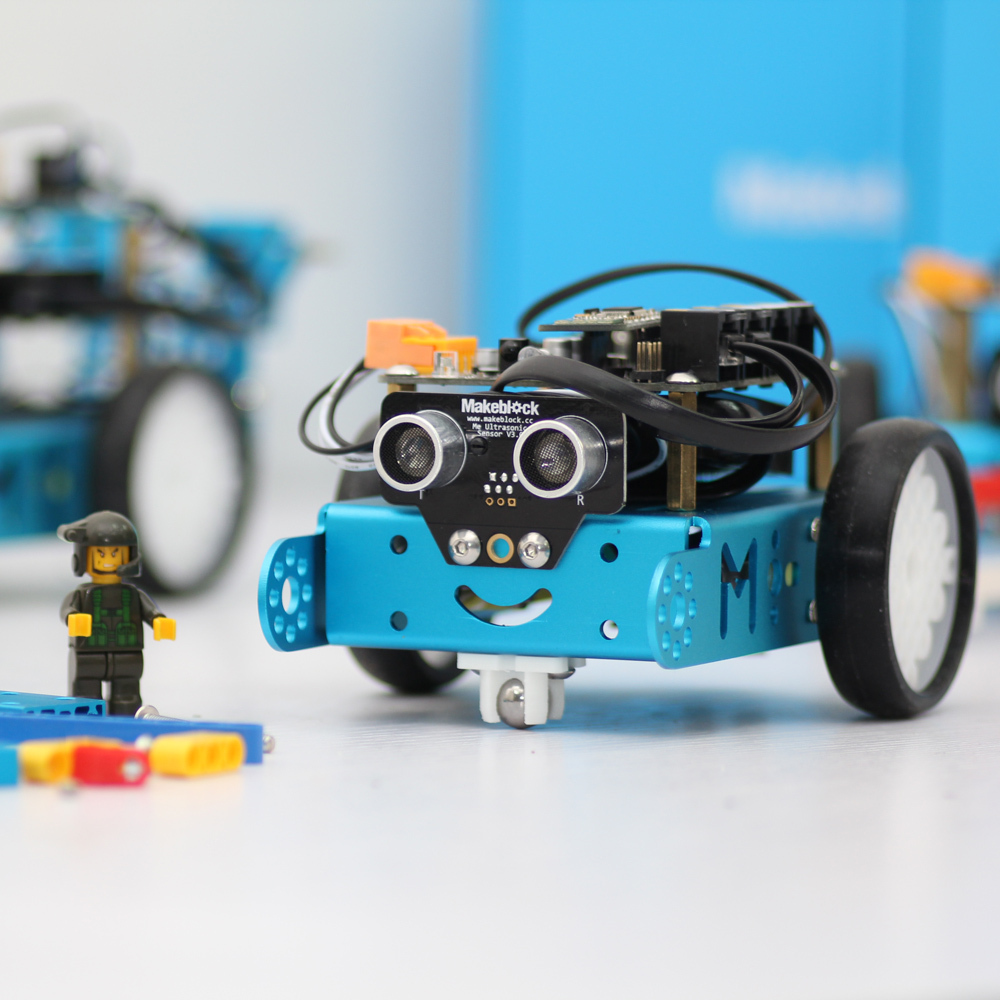
mbot


This is a robot that is from a company called Makeblock, it was originally a Kickstarter project.

You have to build the robot when you receive it and it fairly easy to do and has good instructions. Out of the box it is controlled by a small remote control.  It has a number of built in inputs and outputs, light sensor, sonic sensor, 2 motors, a button, 2 LEDs, IR receiver, buzzer and i'm sure some more.

It can be connected wirelessly to the computer, you should choose the Wireless version as it is more reliable in a school setting.

It is programmed using a piece of software called mblock. It is a version of Scratch so every easy to use if you are familiar with it. It needs to be installed along with a driver installed.

Thoughts

For the price I think this is a super interesting robot. £60ish

  • It has a remote for easy control. 
  • Then once connected to the computer it can be programmed wirelessly. You can make it respond to the keyboard.
  • It can also be used to pass input back into the computer. So you can use the remote that you used to control the mbot to control something on screen


https://www.coolcomponents.co.uk/mbot-2-4g-version-scratch-programmable-robot.html  - Where it can be purchased in the UK.

http://www.makeblock.cc/  - The main site.

http://learn.makeblock.cc/mbot/ - A link to the main site about mbot.

This link shows a review of the robot and some comparisons to other robots.


Crumble

Starter Kit

This is a small board that can be connected to motors, LEDS and other sensors. It only costs £10, the kit in the image above is £16.50

Today I had it connected up to a simple chassis with 2 motors and wheels attached. This is based on something that I had seen before where someone had using it in KS1.


It uses a simple scratch like interface for it to be programmed. You download the code to the crumble then it continue to run on the board. For example you can program the crumble to move motors in the shape of a square. You can also program lights to turn on and flash different colours. 


http://redfernelectronics.co.uk/crumble/ - Link to main site with information and a getting started guide, you can also purchase them from the site.

http://code-it.co.uk/crumble/crumble.html - Links to more ideas.

Thoughts

  • Cheap
  • Introduction to simple electronics.
  • Simple to program
  • Can be used for more than one project.
  • Introduction to wearable tech.

Sphero

Image result for spheroImage result for sphero


A round robot that can be remote controlled. It is has gyroscopic sensors in it. It is a toy but the creators have developed a number of apps that allow you to program it, they are Microlab and orbBasic, though interesting I feel they are quite complicated for primary.


But the Sphero paired with another app called Tickle, then it really unlocks possibilities. I have explored it somewhat. Tickle is another app in the style of Scratch or Hopscotch, you can make activities, games and more on the app, but what is really interesting is that it can connect to a range of devices.


Sphero is just one of them, along with Hue lightbulbs,  it seems that Dash and Dot also are now supported which is great.

https://tickleapp.com/en-us/  - Check out the website and a link to the apps.

Thoughts


  • Robust
  • Easy to use


Thursday, 5 March 2015

Links for CAS Hub Meeting 4th March

Introduction and Welcome - Updates - What has been happening recently?


Updates

http://teachinglondoncomputing.org/ - Courses.

http://www.cs4fn.org/ - Resources.

QuickStart Computing Guides - http://www.quickstartcomputing.org/

New Progressions Doc now in 3 strands. LINK


Discussion: "Shall we unplug?"
  • What does unplugged mean?

  • Look at the CS Unplugged resources.

  • Some Magic!


CS unplugged - What is it.

Showcase website and book. http://csedadmin.webfactional.com/

Show Binary Activity.

Magic trick - Red and Black. Link


Hands on with new resources - Somethings to try out...


Mini-Teachmeet - A sharing of ideas.

  • What have you seen, or used recently that you want to share? What did you see at BETT?

Tuesday, 29 April 2014

Databases Yay!

I know that databases always seem like a dry topic but today lesson was great all due to a really fun resource. It may be old news but I came across a resource called Whodunnit on the Wales HWB Page.


Its is a fairly simple database program that asks you to find suspects in crimes. You have to watch clips of interviews and then using the information narrow the search. It was a great introduction to the idea of interrogating a database.

I extended it very simply by getting the children to come up with their own crime and describe it so one of the suspects on the database would be chosen. This could be taken further and children create there own videos which could tie into there own suspect database.

The children loved it. They where excited about the idea of databases.

Give it a Try.


Friday, 21 March 2014

What is Computing at School all about?

Who is CAS? http://www.computingatschool.org.uk/

Its is a organisation who's job is to develop support and training for teaching Computing and in particular the computer science aspects of the new curriculum. They where one of the organisations who worked on the proposed curriculum and have been recently funded by the DfE.

What is a Master Teacher? - Me, I'm one :o)

A teacher who has skills and expertise in the area of Computing and who wants to share this with others though running CPD session. Normally they will be involved in hub meeting but also they will run more specific training for teachers. http://community.computingatschool.org.uk/events


What is a CAS hub?

Its is a community of teachers who come together to develop and share ideas for the teaching of computing. Its about helping and supporting one another. Different hubs can work in different ways but the important thing is that after a session you should leave excited and with a new idea to use back in school.

Details for the Hammersmith CAS hub which I am running is below. 


Thursday, 6 March 2014

One Great Teaching Idea - Camden CAS Hub

I have many ideas all the time. But if I has to share one at the moment is to look at and use the code.org site. It is great, it has loads to great step by step guides and tutorials and links of where to go next to further explain your knowledge. Great for teachers and Pupils. 
http://code.org/

Monday, 27 January 2014

The FUZE

FUZE powered by Raspberry Pi (case & breadboard)
The FUZE - Think a BBC Micro powered by a Pi. Once again these where spotted on a few stands at BETT. (A post BETT review is coming!) But Drew Buddie has written a great review of the new Fuze.  It is a great solution for making the Pi work easily in the classroom.

Read more here on there official site.